

TOOLS

Welcome to your Toolbox. Here you have links and explanations about all the tools we will use in the Studio. Feel free to explore if it’s your first time here or to come back whenever you need a reminder or a direct link. We will use all of these tools extensively, so we recommend that you familiarize with them before we start the program.
Once we commence the classes, we recommend that you attend them from your computer, since MIRO and others are not accessible from smartphones. We hope that even though some of these might have learning curves that you will need to overcome, that you don’t feel overwhelmed by them. Always remember that we are here to help you and guide you.
Our Toolbox
Many of us are digital natives. Technology is like a second language. But that might not be the case for everyone. We would like to avoid creating a sense of overwhelm when introducing you to new tools. If you ever feel overwhelmed, confused, or disconnected by these technologies, please let us know. On the other hand, we would like to give you as many opportunities as possible, within reason, to try new things and take advantage of the opportunities that come with working together as a collective of creative living beings. Have fun!
There are other tools that everyone will be using on a regular basis, such as Zoom, Google Docs, and Miro.
Note: Not all of these apps and tools that we are using to create this community experience are accessible to everyone. There are select members who have access to some tools, based on the trust earned through collaboration and co-creation.
If you have a passion for working with particular tools and would like to help, reach out and let us know. We could always use help with this enormous collective responsibility and opportunity. We are designing our own experience together, and we want to provide the tools to enable you to feel free to fly creatively.
For casual day-to-day communication, we find that WhatsApp is helpful for keeping people connected in informal one-on-one conversations or group threads. Download WhatsApp for you desktop computer or mobile device. Each coheART has their own Whatsapp channel which is found in your portal.
After you complete the coheART, you are invited to join the Evolutionary (Alumni) chat.
Comms
This is your orientational map on what happens where and how. Below this section you have more details about each one of the platforms.
Announcements: You’ll receive them by email, in the portal and sometimes in our Discord Channel.
Everyday chatter: We found that most people have settled on WhatsApp for casual day-to-day communication.
Projects + co-creation: We created a Discord Channel for all of you to collaborate and co-create in there. It has some private channels for coheART 3 and also public channels where you can interact with the rest of the Design Science Studio community and the entire alumni network. Follow the Community Onboarding process in the Design Science Studio Discord Server by clicking on the Join Discord Server button to access the invite link.
Events: If you want to submit an event, use the form in the main Portal page. Events sent in there + our internal events + fireside chats and others will always be in the Portal and on the appropriate Discord channel. We’ll also link our internal DSS events to a google calendar invitation, and are exploring how to support coheART members to have an opt in calendar that can be subscribed to for coheART events.
Zoom
What can we say about Zoom in 2023 that you don’t know already… If you haven’t downloaded it yet, please do!
We will post the links to the calls in the calendar invites in the calendar above.
We will also be using Zoom and Miro at the same time —
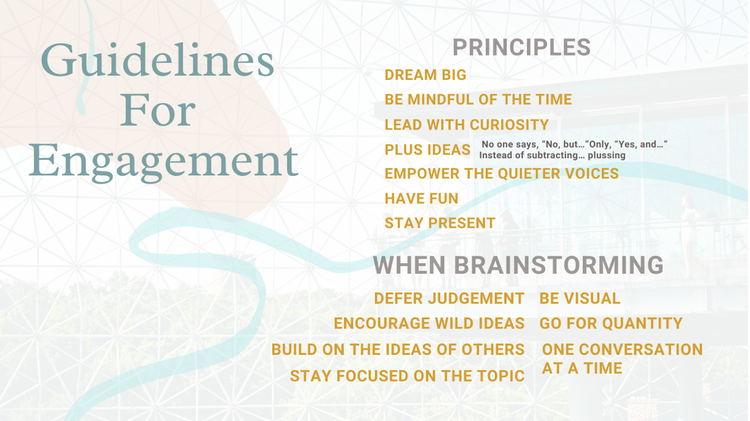
Here are a few etiquette tips for our interactions, and also below you will find some guidelines for productive nourishing sessions:

Airtable
Airtable is a spreadsheet and database application that is used to keep the team organized.
Canva
The team collaborates on images and graphics with Canva to create marketing campaigns.

Catalist
A value-driven ecosystem of tools designed to educate and unite the change-makers of the world.

Discord
A communication platform for text chats and conversations with voice and video integrations.

Google Drive, Docs, Sheets, and Slides are a daily staple for collaborative document creation.

Miro
A digital whiteboard for collaborating on ideas, concepts, diagrams, and systems design.
Notion
A digital whiteboard for collaborating on ideas, concepts, diagrams, and systems design.

Otter
An audio recording and transcription service that can be connected to video meeting, such as Zoom.

Slack
A chat-based productivity app used by the habRitual team to keep connected and organized.

Squarespace
The web platform used to build this website, featuring a drag-and-drop interface.

Substack
A web publishing and email newsletter subscription service that connects us to a public audience.

Topia
A two-dimensional immersive world with interactive artwork, video, audio, and chat.

A dedicated chat application for one-on-one and group conversations and discussion threads.

YouTube
A video platform that the team uses to share presentations and live streams.

Zoom
The online space where we meet for learning and collaboration sessions.
Miro and collaborative notetaking
The magical realm where dreams really do come true. Primarily for brainstorming and collaborative work, Miro will become one of the most used tools in many of our classes and workshops. We strongly recommend that you plan in advance and connect to the sessions through a computer or tablet to be able to participate in the wonders of this productive, collaborative tool.
Some of you loved the images that we’ve been sending in our emails. Some of you were not into them. Good! Now you’ll have a chance to either rejoice in hundreds more of them or contribute some that you like. Dive into our Pinterest Board and enjoy a glimpse at the future, synergetics, dymaxion spheres, geometric patterns and cool retro futuristic and solarpunk art.
If you’d like to be added as a collaborator, leave your pinterest email in this form!